sudo pacman -S solaar
sudo groupadd plugdev
sudo usermod -a -G plugdev your_username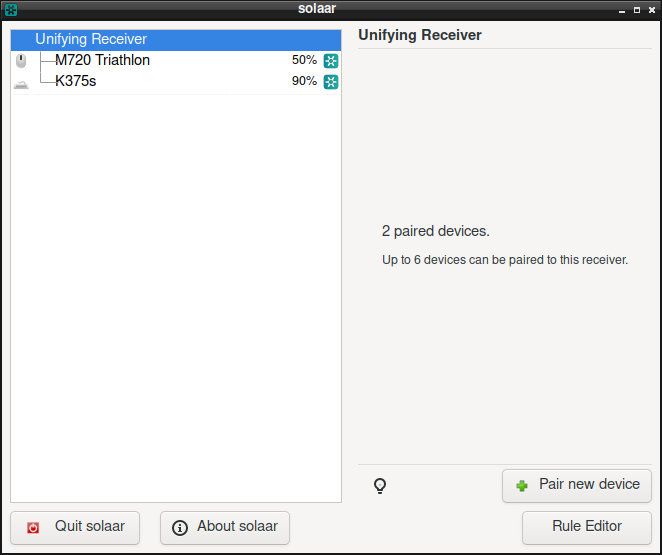
sudo pacman -S solaar
sudo groupadd plugdev
sudo usermod -a -G plugdev your_usernameYou have to install some font that supports it eg.:
pacman -S noto-fonts-emoji
reboot
See Arch Wiki for more details.
The problem is that Windows 11 might try to install newer version of the Fingerprint driver which results in load error:

The solution is to manually download and install older version: WBF advanced, Digital Persona. Inc. V1.7.0.396 (download mirror).
If you have Microsoft 365 you can setup Plone to use Azure login. You need to install pas.plugins.authomatic. It also supports Volto.
In Azure you need to create App Registration. You can follow this guide.
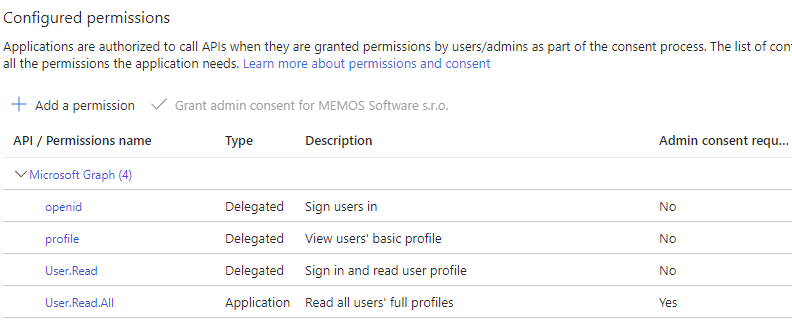
In API Permissions you need to add User.Read.All Application permission.
In Certificates & secrets create a new client secret.
Finally the PAS Authomatic configuration looks like this:
{
    "azure": {
        "id": 1,
        "display": {
            "title": "Azure",
            "cssclasses": {
                "button": "plone-btn plone-btn-default",
                "icon": "glypicon glyphicon-github"
            },
            "as_form": false
        },
        "propertymap": {
            "email": "email",
            "name": "fullname"
        },
        "class_": "authomatic.providers.oauth2.MicrosoftOnline",
        "domain": "ADD_YOUR_TENANT_ID",
        "consumer_key": "YOUR_APP_REGISTRATION_CLIENT_ID",
        "consumer_secret": "YOUR_CLIENT_SECRET",
        "scope": ["openid profile"],
        "access_headers": {
            "User-Agent": "Plone (pas.plugins.authomatic)"
        }
    }
}In Ubuntu you can hibernate your PC by using the following command:
sudo systemctl hibernateThe problem is it does not automatically lock the screen. To lock the screen use:
xdg-screensaver lockNow we can combine it together:
xdg-screensaver lock && systemctl hibernateNote that you will need to enable your user to execute systemctl hibernate without sudo. You can do it by editing /etc/sudoers. Just add:
your-username ALL= NOPASSWD: /usr/bin/systemctl hibernateI was struggling with this issue for a while. After I updated my PC with Windows 10 to Windows 11. I used to connect to this PC remotely using RDP. Any time I disconnected from RDP the PC went to sleep.
I was not able to find anything relevant on Google.
After some more digging in Event Viewer I found some events related to GCloud a part of GService which is software provided by GIGABYTE.
After I uninstalled GService the problem finally disappeared!
Today I upgraded our ZyXEL NAS to firmware V5.21(ABAG.7). After the upgrade, I was unable to into the web interface. SSH login for admin worked fine.
Because of Zyxel security advisory for the remote code execution vulnerability of NAS products — Zyxel Community the password no longer may contain special characters. If you used those special character in your admin password before update, you will need to reset it.
You should be able to reset admin password using the RESET button as stated in the documentation. But that did not worked for me.
If you have admin SSH access to the NAS, you may change the password by executing smbpasswd command. Web interface uses Samba for the authentication. As soon as you change the password using smbpasswd you should be able to login to web interface. Finally change the password in the web interface to make it permanent.
Those of you that use OVH services, might find these domain names helpful.
DNS
cdns.ovh.net / 213.186.33.99
NTP
ntp0.ovh.net / 213.251.128.249
For those who miss an option in Pale Moon to delete older history I have prepared an official add-on for Pale Moon based on legacy version of the same name add-on for Firefox.
You can download it right from Pale Moon’s website.
The source code is available on GitHub.
When you are connected to a NordVPN server you can get use of their CyberSec DNS server, which blocks malware and ads. Their IP addresses are: