The link tag of the generated RSS is now filled with the Google+ profile URL. Some of the widgets working with RSS use this tag to display link for more posts. So now these links will point directly to your Google+ profile.
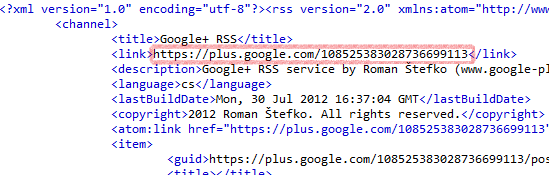
The link tag of the generated RSS is now filled with the Google+ profile URL. Some of the widgets working with RSS use this tag to display link for more posts. So now these links will point directly to your Google+ profile.
Address bar in IE9 displays history and favorites results while you are typing by default. IE9 uses Windows Search to improve the results and also to shorten time necessary to get them. So the reason why favorites might not be displayed is because Favorites folder is not indexed. There are two solutions to fix this situation:
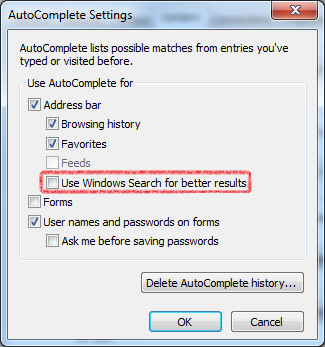
Disable use of Windows Search for these results. Go to Tools > Internet Options > Content tab > AutoComplete Settings button and unclick Use Windows Search for better results.
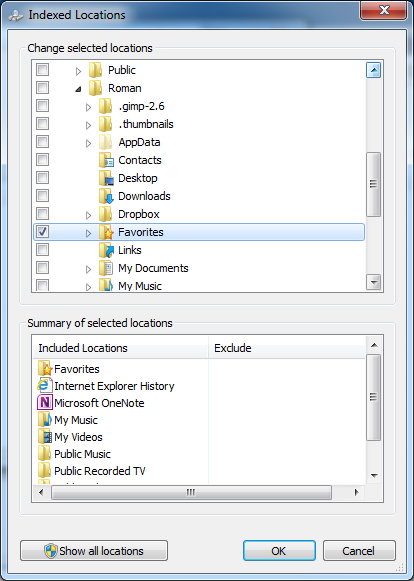
The second and better solution is to add Favorites to the Windows Search index locations. Go to Start and type Indexing Options, click on the Modify button and select Favorites folder under your Windows profile folder.
If you would like to play this old but legendary game on new versions of Windows you may face some problems.

I have prepared small snippet which will help you check whether some text is UPPER case in T-SQL. I have not found any good example while Googling. You can easily update to code to check whether the text is lower case by replacing UPPER with LOWER in the snippet.
DECLARE @Name AS NVARCHAR(64)
SET @Name = 'NAME'

IF BINARY_CHECKSUM(@Name) = BINARY_CHECKSUM(UPPER(@Name))
 SELECT 1;
ELSE
 SELECT 0;
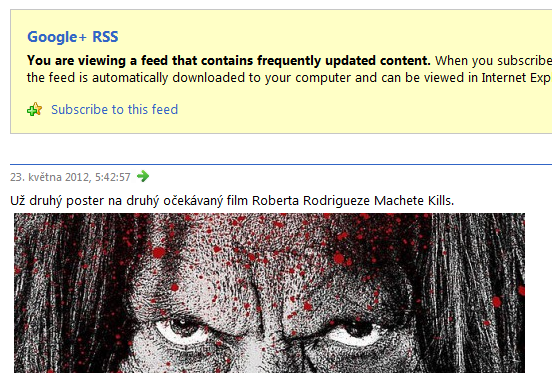
If you make a post with an image – not regular web link, but link to image file – the link will be also added into the RSS feed as an image, so you can see it when viewing RSS feed. Till now only a thumbnail has been available.
So for example a Google+ post might look like this:

and the RSS feed will be created like that:
I have found nice batch script which will remove all folders inside specific folder. This is good when you have some directory with automatic builds and want to remove old scripts from time to time.
ForFiles /P "BASE_FOLDER_PATH" /D -14 /C "CMD /C if @ISDIR==TRUE echo RD /Q /S @FILE &RD /Q /S @FILE"
Replace BASE_FOLDER_PATH with folder containing automatic builds and 14 with maximum number of days. Older folder will be removed.
I am unable to remember this and have to find it each time I need it. In MSSQL there is a great function called ISNULL. It has two parameters. If the first one is NULL it takes the second one. In MySQL ISNULL takes only one parameter and checks whether it is NULL or not. The real replacement for MSSQL‘s ISNULL in MySQL is IFNULL.
You may get the following error when importing existing image to the VirtualBox:
A hard disk with UUID {e9758c99-e50c-41c7-877f-f03c1454d136} or with the same properties (‘image.vhd’) is already registered.
This happens when you make copy of a virtual image and want to add it to VirtualBox, but the original image is also registered. To change the UUID use the VBoxManage utility installed with VirtualBox.
VBoxManage.exe internalcommands sethduuid image.vhd
We are using Redmine in our company for issue tracking and SVN as a source control. As a client I use AnkhSVN primarily, because I am working inside Visual Studio most of the time. In this post I would like to show you plugins for AnkhSVN and TortoiseSVN which will help you assign your commits to specific issues in Redmine.
TortoiseSVN
I will start with plugin for TortoiseSVN. Download the correct version 32bit or 64bit and install it. After that go to the TortoiseSVN Settings > Issue Tracker Integration. Specify working path of your source codes and Atom URL from Redmine. To get Atom URL go to the project page and click on the Issues tab. You can define a view which will select the correct issues for example only those which are open and assigned to you. On the bottom of the page there is a Atom link, copy the address and paste it to the Issue Tracker Configuration Window.
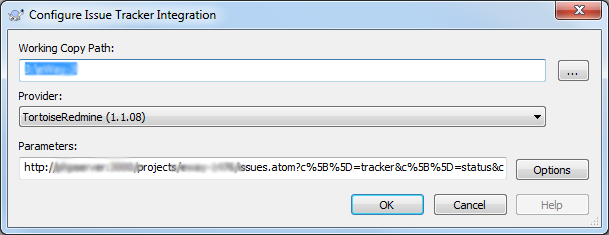
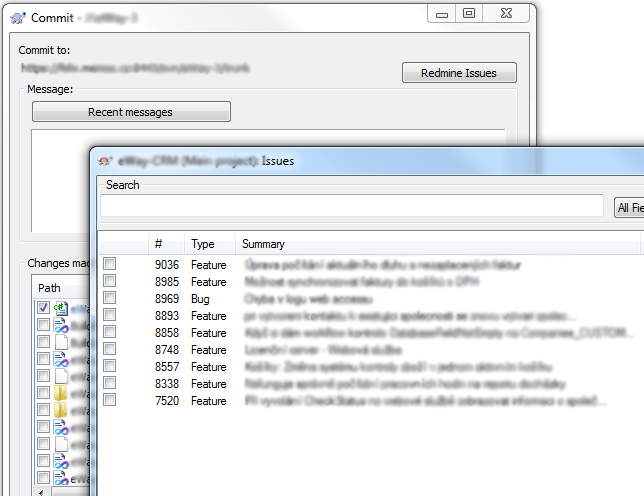
After the Issue Tracker Integration is configured go to the folder with your source codes and try to commit some changes. You will see new button in the Commit window called Redmine Issues. Clicking on it will display window with all issues which can be selected and added to the Commit Message.
AnkhSVN
There is a plugin for AnkhSVN available too. After you install it open some project in Visual Studio. Right click the solution in the Solution Explorer and open Issue Tracker Setup. On the dialog select the new installed connector. After that fill in your credentials. Issue Repository URL is the base URL of Redmine. Click Update button and select your default project. Also make sure that the REST API is enabled in the Redmine Administration.
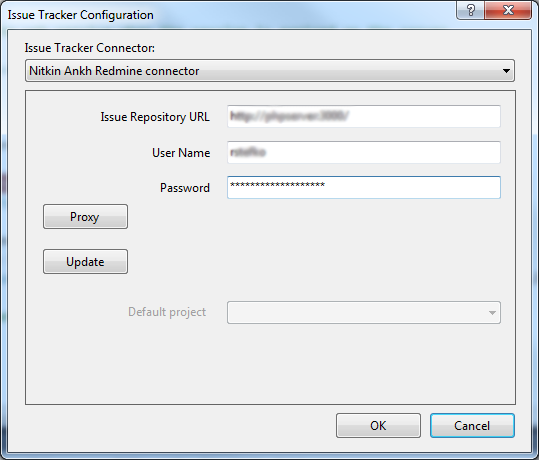
That’s it! You are now able to click on the Issues button in the Pending Changes window and select active issues.
Your ISP may track your communication with tracker to see what your are downloading or block communication with tracker at all. The approach described uses an anonymisation proxy (JonDo) which will transfer all communication with tracker throw this proxy making you untrackable.
Prerequisites
Configuration
After you download both programs run them and go through the initial configuration. After you are finished open Vuze Options and switch to Advanced mode on the first page. Then type proxy in the bottom box. Click on the dimmed Proxy tab and configure it as displayed on the print-screen.
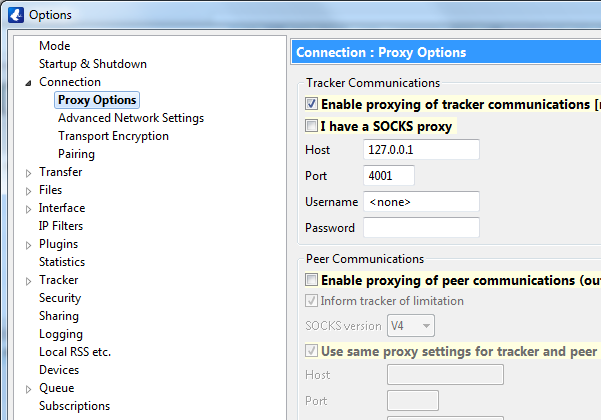
Save the changes and restart Vuze. If no error is displayed on start you should be fine and can start downloading anonymously 🙂