# User friendly time
dmesg --ctimeCategory Archives: Linux
bash
#!/usr/bin/env bash

set -euo pipefail

# Get time
NOW=$(date '+%d/%m/%Y %H:%M:%S');
echo "$NOW: Text"Nginx
Configuration
# HTTP to HTTPS
if ($scheme = http) {
    return 301 https://$host$request_uri;
}

# Proxy
location / {
    include /etc/nginx/proxy_params;
    proxy_pass http://127.0.0.1:5000/;
}

# Custom robots.txt
location = /robots.txt {
    add_header Content-Type text/plain;
    return 200 "User-agent: *\nDisallow: /\n";
}

# Activate HTTP2 (1.9.5+)
listen 443 ssl http2;
Rate limiting
# Use $http_cf_connecting_ip instead of $binary_remote_addr when behind Cloudflare
limit_req_zone $http_cf_connecting_ip zone=php_limit:10m rate=10r/s;
limit_req_log_level warn;

location ~ \.php$ {
    limit_req zone=php_limit burst=50;
}

# Test using bash
for i in $(seq 1 30); do curl -I -s "https://[HOST]/" | head -n 1; doneAutoMySQLBackup
Configuration
```
# Set rotation of daily backups. VALUE*24hours
# If you want to keep only today's backups, you could choose 1, i.e. everything older than 24hours will be removed.
CONFIG_rotation_daily=6

# Set rotation for weekly backups. VALUE*24hours
CONFIG_rotation_weekly=30

# Set rotation for monthly backups. VALUE*24hours
CONFIG_rotation_monthly=90
```apt
CLI
# Clear package cache
apt clean

# Installed package version
apt list --installed | grep [package]

# Get versions of package
apt-cache policy [package]Systemd configuration for Bitwarden
If you run Bitwarden eg. in Proxmox LXC you need to make sure Bitwarden start automatically. Create a configuration file in /etc/systemd/system/bitwarden.service with the following contents.
[Unit]
Description=Bitwarden
Requires=docker.service
After=docker.service

[Service]
User=bitwarden
Restart=on-failure
ExecStart=/opt/bitwarden/bitwarden.sh start
ExecStop=/opt/bitwarden/bitwarden.sh stop

# Script starts docker images and ends
Type=oneshot
RemainAfterExit=true

[Install]
WantedBy=default.target
Enable it, start it and check the logs.
systemctl daemon-reload
systemctl enable bitwarden
systemctl start bitwarden
journalctl -f -u bitwardenCreate bootable Windows installation USB from Linux
Download Ventoy from Github and extract it.
Install Ventoy to USB: sudo ./Ventoy2Disk.sh -i /dev/sdX
Copy Windows installation ISO to USB: cp Win11.iso /run/media/$USER/Ventoy/
Download Gravatar image from CLI
First you need to compute hash of your e-mail.
echo -n "[email protected]" | sha256sumThan you can download it using curl. Replace HASH with the output from the previous command.
curl -fL "https://www.gravatar.com/avatar/HASH?s=500&d=404" -o avatar.jpgParameters
s=500(Gravatar supports 1–2048px size)d=404(If there is no image return HTTP 404)r=pg|r|x(To change rating)
See more information on Gravatar docs.
Fetch hardware info from CLI
Neofetch is no longer supported, but there is actively maintened alternative called fastfetch for fetching system information and displaying it in a visually appealing way.
sudo pacman -S fastfetch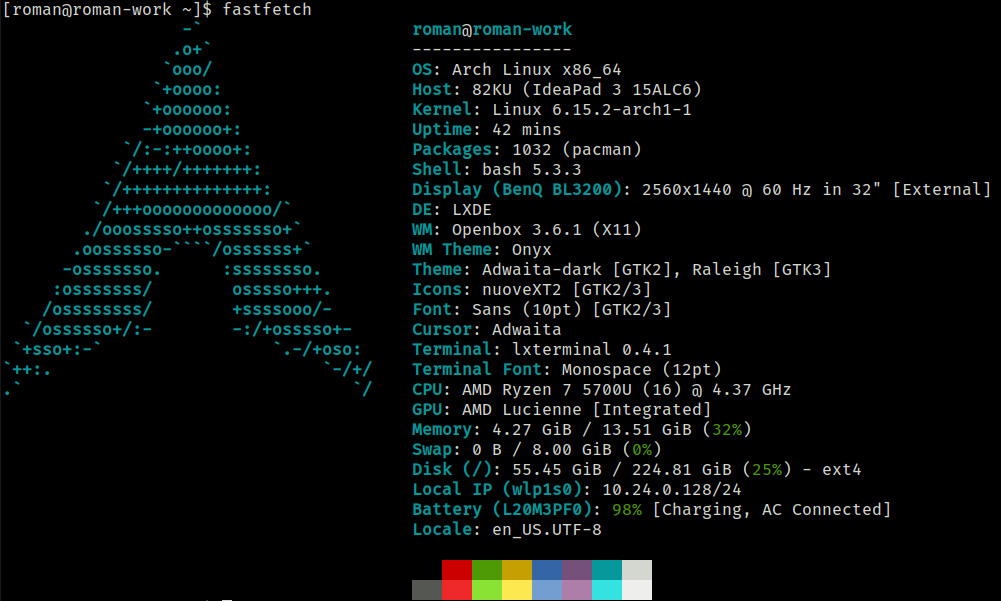
Replace text in multiple files
Using find and sed a text in multiple files can be replaced using a one liner. If you have GIT bash you can do it in Windows too.
In the example below address of old.server.com will be replaced with new.server.com in all Web.config files.
find /c/inetpub/wwwroot -name "Web.config" -exec sed -i 's/old.server.com/new.server.com/g' {} +