- On connection screen press Shift + F10
- Command line window will appear
- Execute command
OOBE\BYPASSNRO - After restart there will be an option I don’t have internet on the same screen
- You can setup local account without password and later connect it to local Active Directory
Category Archives: Windows
Create bootable Windows installation USB from Linux
Download Ventoy from Github and extract it.
Install Ventoy to USB: sudo ./Ventoy2Disk.sh -i /dev/sdX
Copy Windows installation ISO to USB: cp Win11.iso /run/media/$USER/Ventoy/
Replace text in multiple files
Using find and sed a text in multiple files can be replaced using a one liner. If you have GIT bash you can do it in Windows too.
In the example below address of old.server.com will be replaced with new.server.com in all Web.config files.
find /c/inetpub/wwwroot -name "Web.config" -exec sed -i 's/old.server.com/new.server.com/g' {} +Edit files in Altap Salamander using nano
This guide is meant for those who need to work in Windows from time-to-time and would like to have linux feeling.
Prerequisites
In Altap Salamander go to Configuration -> Editors.
| Command | "C:\Program Files\Git\bin\bash.exe" |
| Arguments | --login -i -c 'nano "$(Name)"' |
| Initial Directory | $(FullPath) |
Remarks
--login -i is used to start interactive shell.
-c starts a command (nano …)
powercfg
Disable hibernation
powercfg /hibernate offWhat sleep states are available?
powercfg /availablesleepstatesWhat device caused last wake?
powercfg /lastwakeWhat device blocks sleep?
powercfg /requests

# Ignore driver
powercfg /requestsoverride DRIVER "Realtek High Definition Audio" System

# View ignored drivers
powercfg /requestsoverrideC-TECH Lycaon Gamepad Drivers
The drivers seems to no longer be available on the C-TECH website.
You can download them below.
Cherry MC 4900 driver fails to install on Windows 11
The problem is that Windows 11 might try to install newer version of the Fingerprint driver which results in load error:

The solution is to manually download and install older version: WBF advanced, Digital Persona. Inc. V1.7.0.396 (download mirror).
Windows Vista hangs on “Checking for updates”
Process svchost.exe is taking up the CPU and it looks like it will run forever (in days).
In my case I had a fresh install of Vista SP2. I was able to get rid of this by manually installing some of the updates.
First of all disable Windows Update and restart PC, so that the svchost.exe was in sleep state (no CPU usage).
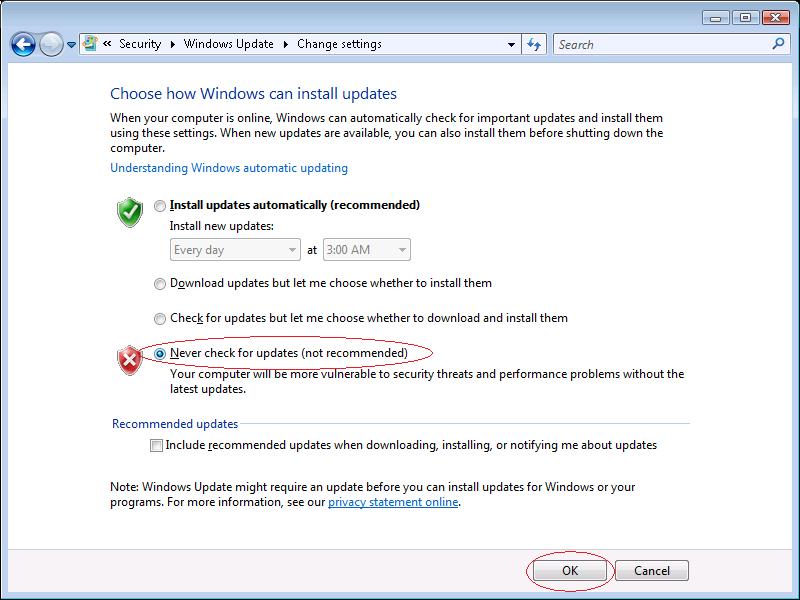
After that it is required to manually install the following Windows updates:
- KB3205638: http://www.catalog.update.microsoft.com/Search.aspx?q=KB3205638 Vista
- KB4012583: http://www.catalog.update.microsoft.com/Search.aspx?q=KB4012583 Vista
- KB4015195: http://www.catalog.update.microsoft.com/Search.aspx?q=KB4015195 Vista
- KB4015380: http://www.catalog.update.microsoft.com/Search.aspx?q=KB4015380 Vista
As soon as the updates are installed and the PC is restarted, you should be able to check and install all updates as usual.
Test SMTP server on Windows using PowerShell
Quick test to find out whether you setup the SMTP server correctly.
Send-MailMessage -SMTPServer localhost -To [email protected] -From [email protected] -Subject "Test" -Body "Test"
Easy migrate your current Windows OS to SSD
If you plan to migrate your current OS to SSD you will need a tool which will help you move the system to the new the disk. In most cases SSD will be smaller then your current disk, so the tool should be able to shrink partitions during the operation.
There is a lot of tools available, but most of them are not free. I have used EaseUS Todo Backup Free which includes this functionality. In my case the disk had 5 partitions, but the OS partition was the third one, but even that was not problem for the EaseUS Todo Backup. It automatically shrunk the third partition, great job!
After you install the software, just click Clone button on the top and start migration in a few seconds.
