Category Archives: Mac

Yubikey FIDO2 SSH and MacOS

Even on MacOS Sequoia ssh does not support FIDO2. You need to install openssh using brew, otherwise you may get error Cannot download keys without provider when you try to import resident keys from Yubikey using ssh-keygen -K.

After you install openssh brew install openssh, restart terminal and make sure which ssh displays /opt/homebrew/bin/ssh.

Another problem that you may face, which is not related to MacOS is error Provider "internal" returned failure -1. The problem is that you may generate SSH key on Yubikey without FIDO PIN. But if you do not set FIDO PIN, you cannot import the key. Fortunately you can set the PIN later.

ykman fido access change-pin
Connect to Mac using VNC from Windows using encrypted connection

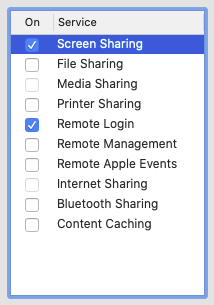
On Mac you need to enable Remote Login and Screen Sharing.

Note: If Remote Login is not starting with message “Remote Login starting…” you might need to manually add a launch daemon:
sudo launchctl load -w /System/Library/LaunchDaemons/ssh.plist

On Windows run Powershell and create encrypted SSH tunnel. Replace USERNAME with your user name and MAC_IP_ADDRESS with IP address of your Mac.

ssh -L 25900:127.0.0.1:5900 USERNAME@MAC_IP_ADDRESS

Now use a VNC client (eg. RealVNC Viewer) and connect to 127.0.0.1:25900. RealVNC will still complain about unsecure connection but the connection will be local only (127.0.0.1).